Un cliente pide hablar con alguien, y quien responde eres tú.
Pasar el chat a una persona en cuanto un cliente lo pide.
OpusDone pasa el chat en cuanto la conversación te necesita: se detiene, avisa al cliente de que una persona toma el control y te pone el chat delante. Si un cliente pide hablar con una persona y el modelo no escala, el runtime escala igualmente. Dos toques y ya estás escribiendo.
- Escala el runtime, no el prompt
- El email ignora el horario de silencio
- Dos toques para tomar el control
Revisado el

Estar disponible no es lo mismo que enterarte.
Casi todos los pasos a una persona se rompen en uno de tres sitios: el modelo no se da cuenta, el aviso se queda retenido, o te llegan tantos avisos que dejas de leerlos.
El modelo decide si te enteras
Un cliente educado pide dos veces hablar con una persona, el modelo sigue respondiendo tan amable, y a ti no te avisa nadie. Un comportamiento así de importante no debería vivir en un prompt.
El único aviso que importaba esperó a la mañana
El horario de silencio existe por algo, y luego se traga el mensaje del cliente que estaba a punto de marcharse.
Un cliente, tres notificaciones
Una visita se convierte en lead, reserva una cita y después pide hablar con una persona. Tres eventos, una sola persona, y un móvil que ya te ha enseñado a ignorarlo.
¿Cómo es una escalada de OpusDone, minuto a minuto?
Cinco motivos escalan una conversación: low_confidence, sensitive, explicit_request, tool_failure y other. sensitive está fijado y no se puede desactivar.
- 18:42
El cliente lo pide
Una barrera de palabras clave EN/ES capta «speak to a human» y «quiero hablar con una persona», y si el modelo no escala, el runtime escala igualmente.
- 18:42
Salen los avisos
La campana de la app suena siempre, el email se envía siempre y nunca lo retiene el horario de silencio, y Telegram llega también si lo has conectado.
- 18:43
Lees la tarjeta
Cliente, canal, motivo y los últimos cinco mensajes, con [Tomar el control], [Ver más] para quince más y [Abrir en el panel].
- 18:44
Dos toques y es tuya
El asistente se pausa, la conversación se te asigna, la tarjeta se reescribe en el sitio y las de tus compañeros se actualizan para decir quién la ha cogido.
- 19:14
Se devuelve sola
Treinta minutos de silencio devuelven la conversación a tu asistente y te avisan de que lo ha hecho.
¿Qué pasa cuando un cliente pide hablar con alguien?
- 01
Se registra el motivo
Existen cinco motivos: low_confidence, sensitive, explicit_request, tool_failure y other. El motivo sensitive está fijado y no se puede desactivar. - 02
El runtime escala igualmente
Si un cliente pide hablar con una persona y el modelo no escala, el runtime escala por su cuenta. El comportamiento obligatorio vive en el código, no en las instrucciones. - 03
Una barrera de palabras clave capta la frase
En inglés y en español: «speak to a human», «quiero hablar con una persona», «put me through», «atención al cliente». A propósito ignora antes las frases «AI agent» y «chatbot», para que alguien que dice que quiere comprar un agente de IA no acabe escalado. - 04
Se avisa al cliente
Se le dice que una persona toma el control, y la conversación se marca como pendiente de acción, así que se encienden el distintivo del panel y el carril «te necesita ahora». - 05
A ti se te avisa
La campana de la app siempre, y el email siempre: nunca lo retiene el horario de silencio. También Telegram, gratis, si lo has conectado. Como mucho un aviso por persona, por cliente y por canal en cada ventana de 15 minutos. - 06
Lees lo justo para decidir
El email lleva quién es, por qué canal ha entrado, por qué escaló, un resumen en tres puntos, la transcripción reciente y un botón. La tarjeta de Telegram lleva los últimos cinco mensajes y tres botones. - 07
Tomas el control en dos toques
El asistente se pausa, la conversación se te asigna y la tarjeta se reescribe en el sitio. Las copias de la tarjeta de tus compañeros se actualizan para decir quién la ha cogido. - 08
Devuelves el control cuando terminas
[Devolver] reanuda el asistente, [Marcar como hecha] cierra la conversación, y 30 minutos de silencio devuelven el control por sí solos y lo dicen en el chat.
La conversación te llega ya leída.
Cuando un cliente pide una persona recibes quién era, por qué canal, por qué se escaló, un resumen de tres puntos y los últimos mensajes, en tu bandeja y en el móvil. Coges una conversación que ya entiendes en lugar de pedirle a alguien que se explique dos veces.
¿Cómo te avisa OpusDone de que un cliente necesita a una persona?
El email de escalada
Quién es, por qué canal ha entrado, por qué escaló, un resumen de IA en tres puntos, la transcripción reciente y un botón que abre la conversación. Se envía sea la hora que sea.

La tarjeta de Telegram
Nombre del cliente, canal, motivo y los últimos cinco mensajes, con [Tomar el control], [Ver más] y [Abrir en el panel]. Ver más muestra 15 más. La transcripción completa nunca se vuelca sola en un chat.
Los avisos de Telegram son gratis y opcionales.
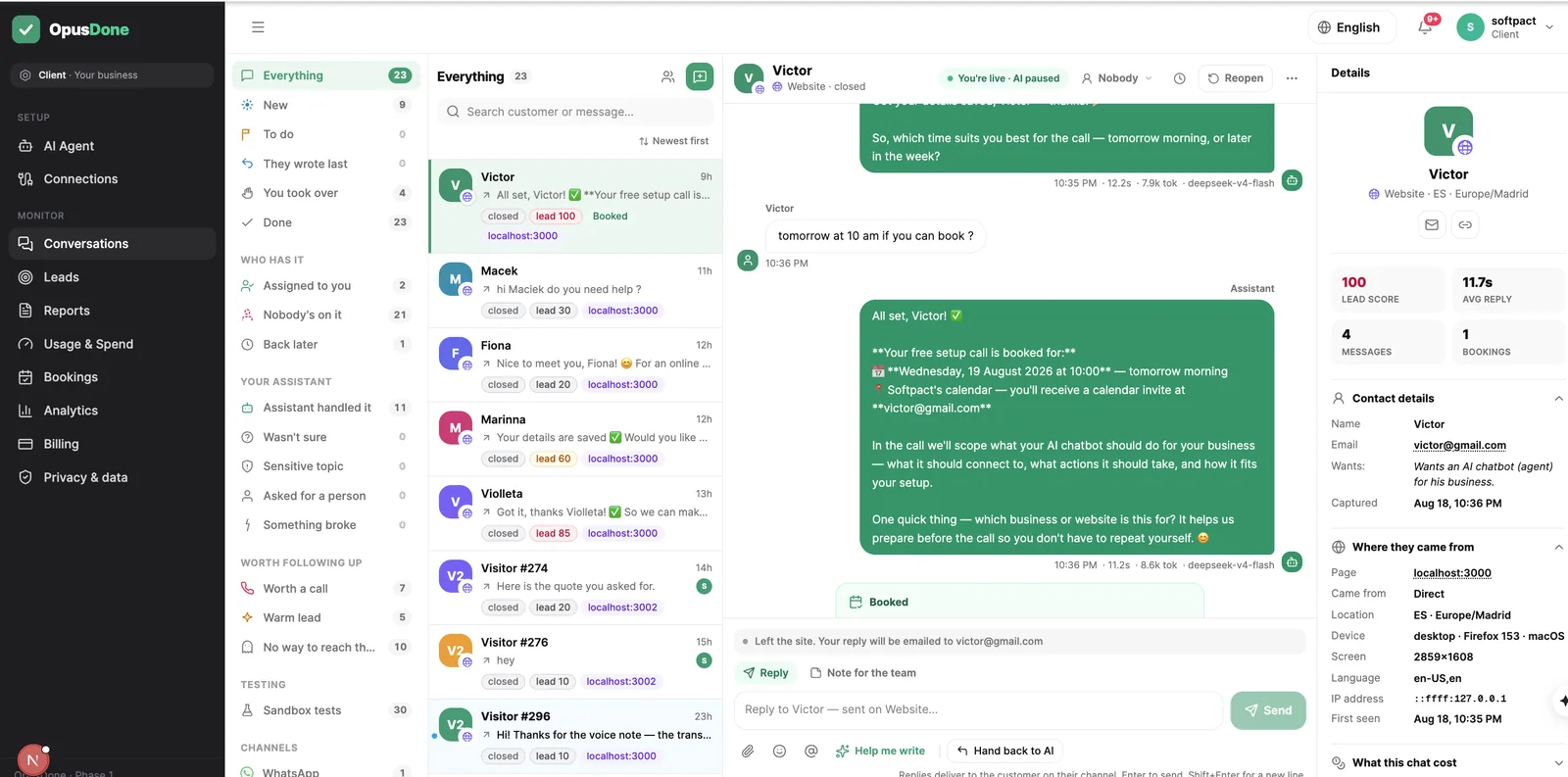
La bandeja del panel
Tomar el control, asignar a un compañero, posponer, etiquetar, responder con adjuntos, insertar una respuesta guardada escribiendo «/», o dejar una nota interna que el cliente nunca ve. «Ayúdame a escribir» y la traducción producen borradores que nunca se envían solos.
A quien visitó la web y cerró la pestaña le llega tu respuesta por email.

El paso a una persona ocurre en la misma ventana en la que ya estaba.
A nadie le gusta que le digan que mande un correo. Cuando el asistente se aparta, la misma conversación sigue en el mismo sitio: el cliente no se repite, y quien la recoge puede leer todo lo que ya se dijo.
- ¿Han pedido una persona? Pasa la conversación al momento: ese camino es código, no una instrucción.
- También la pasa por su cuenta cuando no está seguro, y lo dice claramente.
- Si el visitante ya cerró la pestaña, tu respuesta le llega por correo.
- En cualquiera de los dos casos recibes la conversación entera, así que nadie empieza por un resumen.

Límites con los que puedes contar.
Tomar el control es una función pequeña con muchas formas de dejarte en evidencia. Estas son las que hemos cerrado.
El cliente nunca está en tu Telegram
Respondes desde la tarjeta y el mensaje se entrega en el canal propio del cliente. Cada acuse nombra el destino, con la forma «Enviado a María en el chat de la web».
No dejará un mensaje delicado en tu bandeja
«Sensible» es uno de los cinco motivos de escalada y está fijado de forma permanente. En una escalada sensible, tanto el email como la tarjeta retienen el contenido por completo: se te dice que hay un tema sensible que te necesita, quién es y por qué canal, y el resto lo lees en el panel, a propósito.
No adivina a qué cliente te referías
Llevar dos conversaciones a la vez implica citar la tarjeta correcta. La ambigüedad se rechaza por su nombre en lugar de resolverse a base de suposiciones.
No habla por encima de ti
El runtime vuelve a comprobar la marca de pausa justo antes de confirmar una respuesta, y descarta la del asistente si te has metido a mitad de turno.
No deja un control tomado abierto en dos sitios
Un control tomado desde el panel termina el vínculo de Telegram, y uno empezado desde Telegram termina el del panel.
No pierde un aviso en silencio
Un registro de entregas guarda una fila por destinatario y canal, incluidos los avisos que se suprimieron a propósito y el motivo por el que se hizo.
No rompe la conversación
Cualquier herramienta que falle escala hasta ti y el chat sigue adelante. El cliente ve una frase, no un callejón sin salida.
Preguntas sobre el paso a una persona
¿Y si el modelo no se da cuenta de la petición?
¿El horario de silencio puede esconder un paso urgente a una persona?
¿Y si tomo el control y luego se me olvida?
Alguien dice que quiere comprar un agente de IA. ¿Me van a avisar?
¿Cuántos avisos genera un cliente muy activo?
¿Puedo responder desde Telegram a dos clientes a la vez?

Más sobre escaladas y avisos
Pide una persona, responde una persona, siempre.
Las respuestas que escribes en Telegram se entregan en el canal propio del cliente, y cada acuse nombra el destino; el cliente nunca está en tu Telegram. En una escalada por tema delicado, tanto el email como la tarjeta de Telegram retienen el contenido por completo. Gratis para construir y probar, sin tarjeta; 14 días desde que sales en directo. Consulta la página de precios para ver los planes de hoy.
Empezar