Una agenda para cada médico, y un asistente que las conoce todas.
Una recepcionista con IA que lleva la agenda de cada médico a la vez.
OpusDone da a cada médico de tu clínica su propia agenda — su horario, su duración de cita, su descanso, su especialidad — y una sola recepcionista con IA que reserva en todas. Un paciente pide una consulta y solo se le ofrecen las horas que tiene libres de verdad el médico que la hace. La disponibilidad se lee de Google Calendar o Cal.com en el momento de escribir, así que dos pacientes no pueden coger el mismo hueco. Responde a las 22:10 igual que a las once de la mañana, y todo lo clínico pasa a una persona.
- Una agenda para cada médico
- Horas reales, sin citas duplicadas
- Todo lo clínico pasa a una persona
Revisado el

Una agenda para cada médico. Un asistente.
opusdone.com/go/demo
Escanea y habla con una clínica con varios médicos.
El código abre un asistente de OpusDone real que lleva una clínica de demostración con varios médicos, cada uno con su agenda, su horario y su especialidad. Pide algo que solo hace uno de ellos y solo te ofrece la disponibilidad real de ese médico. Pide la primera cita con cualquiera y mira todas las agendas. Esta es tu recepción, cubriendo un turno que nadie paga.
Pide un tratamiento
Di lo que necesitas. Dirige por especialidad y solo ofrece a los médicos que de verdad lo hacen.
Pide la primera hora libre con cualquiera
Mira todas las agendas de la clínica y devuelve el primer hueco real, indicando de quién es.
Pregunta a quién vas a ver
Nombra al médico antes de escribir nada, porque una cita con nadie en concreto no es una cita.
Pregúntale algo clínico
Se para, dice que le atenderá una persona y lo marca, ocultando el contenido en el aviso. Ese límite está en el runtime, no en un prompt.
Es una clínica de demostración en directo con varios médicos, no una grabación. Imprime el mismo código en tu puerta y quien responde es tu clínica.
¿Cómo lleva un solo asistente a todos los médicos?
El paciente elige al médico, el tratamiento, o ninguno de los dos
Puede pedir a un médico por su nombre, pedir un tratamiento y ser dirigido por especialidad, o pedir la primera hora con cualquiera y recibir el primer hueco real de toda la clínica, siempre indicando de qué agenda sale.
La persona es obligatoria antes de escribir una cita. No puede dejarla en la agenda de nadie.
Cada agenda mantiene sus propias reglas
Su horario, su duración de cita, su descanso, su especialidad, su lista de servicios y sus días cerrados. Nada se mezcla y nada se comparte, así que los veinte minutos de una cita de un médico nunca se convierten en los noventa de la de otro. La disponibilidad se vuelve a leer en el momento de escribir, así que dos pacientes no pueden coger la misma hora.
Google Calendar o Cal.com, por persona. No se conecta ningún otro proveedor.
Las preguntas que te quita de la recepción
Cinco que responde hoy, con el conocimiento que tú has aprobado: «¿Estáis cogiendo pacientes nuevos?» · «¿Cuánto cuesta una primera consulta?» · «¿Veis a niños, y desde qué edad?» · «¿Hay aparcamiento cerca de la clínica?» · «¿Puedo pagar el tratamiento a plazos?».
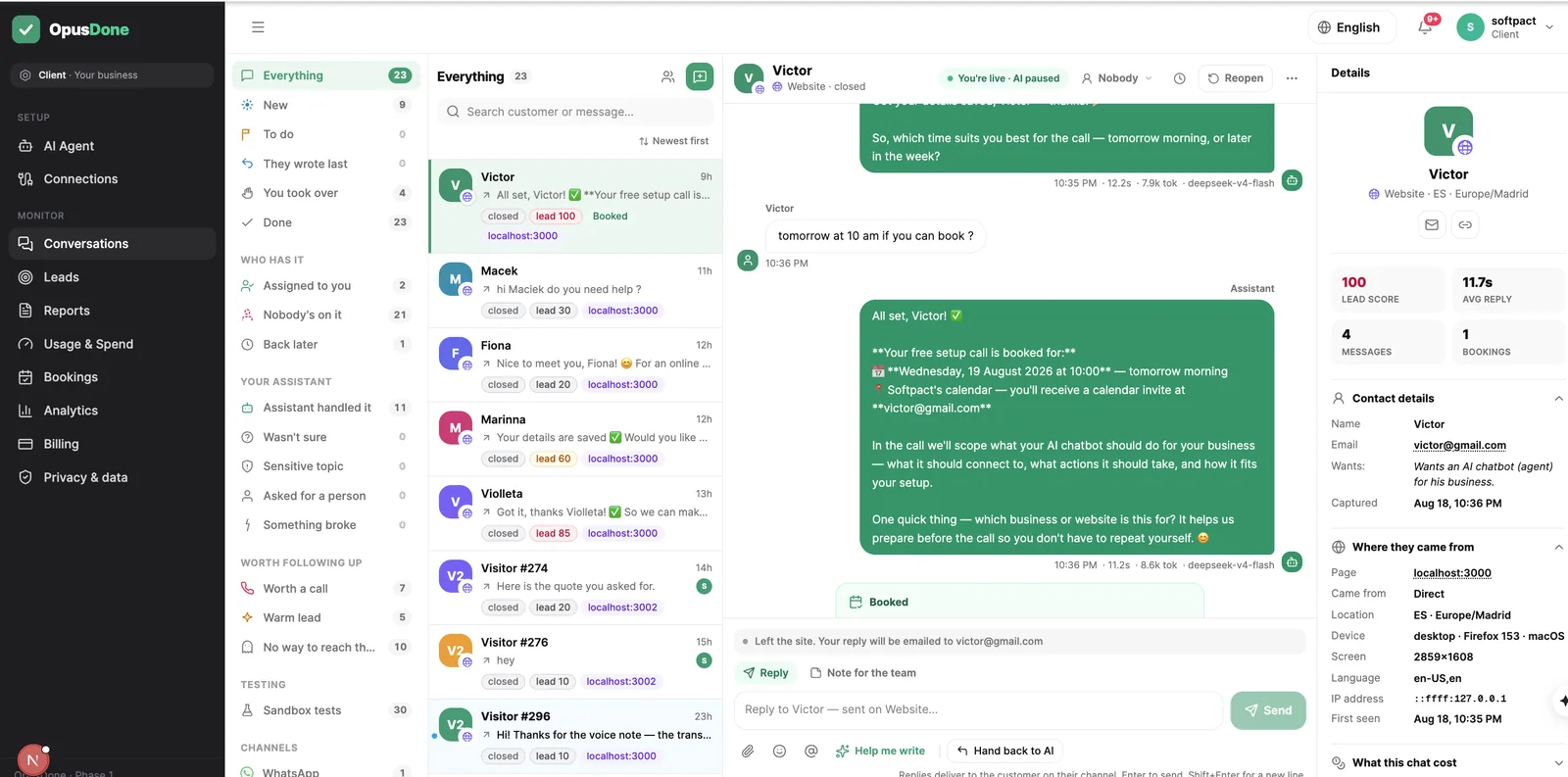
Abres el panel y ves una lista corta, no una transcripción
Cada persona se convierte en un lead con una puntuación clara sobre 100 — un teléfono vale 40, un email 40, una cita 40 — y te avisamos a partir de 50, porque con una vía para localizar a alguien basta. Quien mostró interés real y no dejó ningún contacto va a su propia lista, para que veas lo que estuviste a punto de tener.
Filtra, busca, ordena y exporta a CSV.

Un día entre las agendas de todos
La recepción está al teléfono. El asistente atiende a todos los demás.
- 09:12
Una cita de rutina, pedida desde la sala de espera
La recepción está al teléfono con el laboratorio. La paciente escanea la tarjeta, elige al médico de siempre y coge un hueco del jueves de esa agenda, no de la de otra persona.
- 18:40
Una consulta especializada se dirige sola
La clínica cerró a las seis. Pregunta por un tratamiento que solo hace uno de tus médicos, solo se le ofrece la disponibilidad real de ese médico, y pide cita antes de mirar en otro sitio.
- 22:10
Una paciente con dolor
Le explica cómo funciona una cita de urgencia con las respuestas que has aprobado, no dice nada sobre su muela, y le ofrece la primera hora que tenga libre cualquiera de la clínica.
- 22:19
Escribe algo preocupante
El mensaje se trata como sensible, así que el aviso te dice que hay un tema sensible que te necesita y oculta lo que escribió.
- 07:45
Abres una lista, no una agenda por médico
Ya hay tres citas dentro, cada una con el nombre del médico que le toca, y el único aviso que te necesitaba espera con un solo botón.
¿Por qué una clínica con varios médicos pierde citas?
Casi nada de esto es complicado. Primero es un problema de agenda, y después un mensaje sin contestar.
Una agenda cada uno, y una línea de teléfono
Tu recepcionista tiene el teléfono en la mano, hay tres personas esperando en el mostrador y la pregunta es si un médico concreto tiene algo antes de fin de mes. Cada cita es una vuelta por la agenda de cada médico, y desde fuera no se ve ninguna.
Las mismas seis preguntas, siempre
Si cogéis pacientes nuevos. Cuánto cuesta una primera consulta. Si veis a niños. Dónde se aparca. Todas se han contestado ya, de pie y con los guantes puestos.
El hueco del jueves por la tarde
Una anulación a las cuatro deja un hueco que no llena nadie, porque llenarlo significa ir llamando por una lista mientras el siguiente paciente ya está en el gabinete.
De tu web a tu lista de espera
Nada de esto necesita que venga un proveedor ni que cambies cómo funciona ya el gabinete. Puedes hacerlo entero entre dos pacientes.
- 01
Lee la web de la clínica que ya tienes
El rastreo busca tus páginas de tratamientos, precios, preguntas frecuentes, contacto y horario por palabras clave en inglés y en español, y después lee la meta descripción, las etiquetas Open Graph y el JSON-LD para sacar tu teléfono, tu dirección y tu horario. Una sola pasada del modelo convierte eso en servicios, preguntas frecuentes y políticas estructuradas, más cuatro a diez borradores de conocimiento. Solo rellena campos que siguen vacíos, así que lo que alguien de la clínica haya escrito no se puede sobrescribir nunca. - 02
Apruebas cada palabra que puede ver un paciente
Al asistente solo le llegan las entradas que marcas como activas. Los borradores, lo importado pendiente de aprobar, lo archivado y lo rechazado son invisibles para él, así que un tratamiento que dejasteis de ofrecer en marzo sencillamente no está. Un filtro de calidad tira los menús de navegación y el texto de cookies, todo lo que baje de 80 o pase de 4.000 caracteres, y los casi duplicados con un 85 % de solapamiento. - 03
Pones horario de gabinete, cierres y antelación
El horario de trabajo, y los días cerrados marcados haciendo clic en un día o arrastrando sobre un puente entero en el calendario del mes. La antelación mínima son 120 minutos por defecto, los huecos 30 minutos, los márgenes cero y el horizonte 60 días, todo editable, y las horas caen siempre en una rejilla fija de 15 minutos. Los cierres se replican en Google como un evento de todo el día «Closed — {tu negocio}», y borrar ese evento no vuelve a abrir el día. - 04
Conectas una agenda para la clínica, o una para cada médico
Google Calendar por OAuth y sin clave de API, o Cal.com con una. Lee todos los calendarios que marques como ocupados y los fusiona, así que el curso de un médico o un compromiso tuyo en otro sitio bloquean el hueco. Puede dar cita a la clínica en conjunto, o a un médico concreto en cuanto cada uno tiene su propia agenda, y los permisos son estrechos a propósito: puede leer y crear eventos, y no puede borrar tus calendarios. - 05
Lo pruebas como varios pacientes distintos
El sandbox ejecuta tus instrucciones reales y tus herramientas reales, y después se detiene antes de escribir nada. No se crea ninguna cita, ni ningún lead, ni se manda ningún aviso, ni salta ninguna escalada. Escribe el mensaje que escribiría un paciente asustado a esa hora y lee lo que vuelve: el sandbox es gratis y nunca está detrás de un plan. - 06
Una línea en tu web, y ya funciona
El widget es una sola etiqueta script en la web que ya tienes, sin iframe y sin rehacer nada, y Telegram es el segundo canal activo; todos los canales entran en la misma función, así que la respuesta no depende de la puerta por la que haya venido el paciente. El horario y los días cerrados se comprueban antes de ofrecer un hueco y otra vez antes de escribirlo, y la disponibilidad se relee en el momento de escribir para que dos pacientes no puedan coger el mismo hueco. Contesta en el idioma en el que ha escrito el paciente, y el aviso de IA que exige el artículo 50 del Reglamento Europeo de IA se añade una vez por conversación después de que el modelo escriba, y ningún prompt puede quitarlo.
Una agenda para cada médico. Un asistente para todas.
Cada médico mantiene su horario, su duración de cita, su descanso y su especialidad, y el asistente reserva en todas: solo ofrece las horas que esa persona tiene libres de verdad. Quien pide cita con cualquiera recibe el primer hueco de la clínica. Business incluye cinco personas y Pro diez.
Se eligen una vez y se dejan en paz
¿Qué no hará nunca OpusDone en tu clínica?
Los límites son el producto. Una recepción que adivina es peor que una recepción cerrada.
No dará consejo clínico
Ni triaje, ni opinión sobre qué puede ser ese dolor, ni «parece que». Dice que le va a atender una persona y va a buscarla.
No se inventará un precio ni un tiempo de espera
Si el precio de un tratamiento no está en el conocimiento que has marcado como activo, dice que no lo tiene y te pasa la consulta. Los borradores, lo importado de la web pendiente de aprobar y lo archivado son invisibles para él.
No mirará la foto del problema
No entiende imágenes ni documentos. Un adjunto que no puede leer se salta el modelo por completo: lo dice con claridad y trae a una persona.
No se hará pasar por tu recepcionista
El aviso de IA que exige el artículo 50 del Reglamento Europeo de IA se añade después de que el modelo escriba, una vez por conversación, en el idioma del paciente, y ningún prompt puede quitarlo.
Dudas del asistente de IA para clínicas dentales
¿Puede un paciente pedir cita con un médico concreto?
Un paciente escribe en catalán, o en alemán. ¿En qué idioma contesta?
¿Cómo evitamos que diga algo que la clínica no ha aprobado?
¿Qué pasa si un paciente escribe algo angustioso a medianoche?
Llevamos las citas en nuestro software de gestión. ¿Sirve igual?
Alguien con dolor pide hablar con una persona a las once de la noche. ¿Qué pasa?
¿Podría acabar dando consejo clínico?

Más para clínicas dentales con la agenda llena
Cada agenda, atendida por un asistente
Widget web y Telegram, sobre Google Calendar o Cal.com. Lleva la logística y pasa a una persona todo lo clínico. Cada lead captado se escribe en una hoja de Google de tu propio Drive en menos de un minuto, gratis en todos los planes — y el resumen de la conversación está desactivado por defecto, así que puedes enviar los datos de contacto de un paciente sin transmitir nunca lo que dijo.
Empezar