AI assistant for your website
An AI assistant for your website. It answers, books and takes the deposit.
OpusDone goes on the site you already have with one line of code. It answers from what you approved, offers real times from your calendar and takes the deposit, and passes anything unusual to you. Visitors type, talk out loud or tap Call.
- One line of code
- Replies in seconds
- No commission on payments
 Colour, cut and care
Type it, say it, or call.
Some visitors write. Some would rather speak. On a phone, some just want to call. The same assistant answers all three, from the same prices and the same calendar.
Talk and Call use the minutes of your phone package. Chat is on every AI plan.
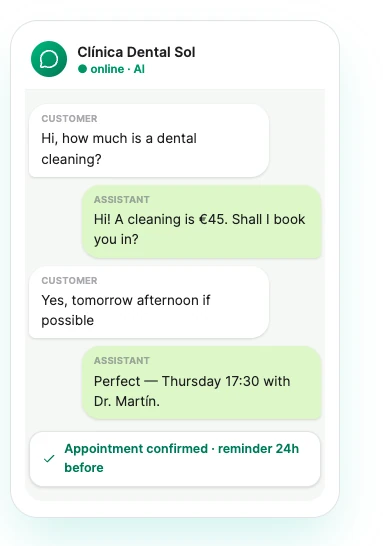
Website enquiries are lost quietly.

From “are you free on Saturday?” to a paid booking.
Every step happens in the chat window on your own site. Nobody is sent to another page.
- 01 · Asks
Answers from your info
Prices, services and hours you approved.
- 02 · Answers
In their language
It replies in the language the visitor wrote in.
- 03 · Picks
Offers real times
Read live from the calendar, so nothing is double-booked.
- 04 · Pays
Takes the deposit
Into your own Stripe. OpusDone takes no commission.
- 05 · Booked
You are told
The booking is in the calendar and the reminder is set.
It does not pass the enquiry on. It creates the order and gets you paid.
Most website assistants stop at "I’ll pass that on". This one holds the time, creates a real order, sends a payment link and writes the appointment in — into your own Stripe account, with no commission to us on any of it.
- The full price, a deposit, or nothing until they arrive. Set per service, so a consultation can be free to book and a tattoo can need €30 down.
- The time is held while they pay. About fifteen minutes. If the payment never arrives the slot goes back, and nobody has a half-booked appointment.
- Only your bank marks it paid. The chat cannot confirm a payment — Stripe’s confirmation does. An assistant that believes "I’ve paid" is a refund waiting to happen.


Customers can show you, not just tell you.
Photos and documents come straight to you. Voice notes are answered.
- A photo
The assistant confirms it arrived, says plainly it cannot open pictures, and passes the chat to you, flagged.
- A document
PDFs, Word and Excel files up to 25 MB. You can set a lower limit or switch uploads off.
- A voice noteWith a phone line · in AI Pro
Visitors hold a button and speak, with nothing to install. The assistant answers what they said.
On your site in three steps.
- 01Paste one line
Add it once where your site builder takes custom code. There is no iframe and nothing to rebuild.
<script src="…/widget.js" data-site-key="…" defer></script> - 02Approve what it says
Point it at your website and it drafts your services, prices and hours. Only what you mark as live is ever said.
- 03Test it, then go live
Try it first in the private test chat. When the answers sound like you, switch it on.
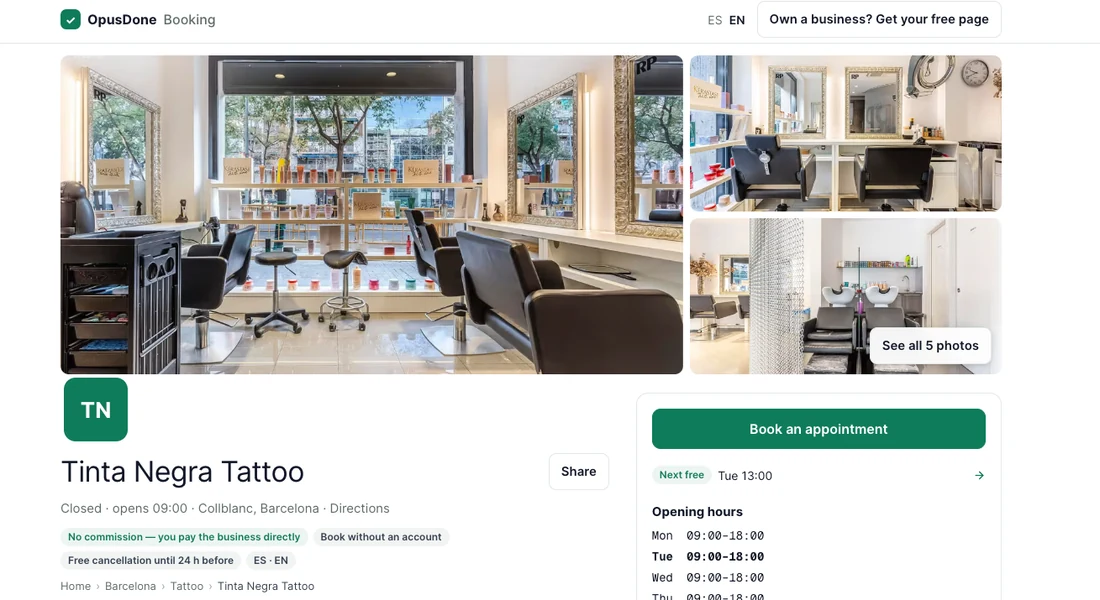
Every business gets its own booking page with the same assistant on it. Share the link or print the QR code.
See the booking pageA form, a chat widget, or an assistant that books.
| Contact form | Typical chat widget | OpusDone | |
|---|---|---|---|
| Answers at 11 pm | Next morning | Scripted replies | From your own info |
| Books a real time | No | Sends a link | In the chat |
| Takes a deposit | No | Rarely | Into your Stripe |
| Replies in their language | One form | Varies | Yes |
| Visitors can talk or call | No | Rarely | Talk and Call us |
| Same answers on the phone | No | Separate tool | One assistant |
| Says when it does not know | — | Varies | And hands it to you |
- Answers at 11 pmContact formNext morningTypical chat widgetScripted repliesOpusDoneFrom your own info
- Books a real timeContact formNoTypical chat widgetSends a linkOpusDoneIn the chat
- Takes a depositContact formNoTypical chat widgetRarelyOpusDoneInto your Stripe
- Replies in their languageContact formOne formTypical chat widgetVariesOpusDoneYes
- Visitors can talk or callContact formNoTypical chat widgetRarelyOpusDoneTalk and Call us
- Same answers on the phoneContact formNoTypical chat widgetSeparate toolOpusDoneOne assistant
- Says when it does not knowContact form—Typical chat widgetVariesOpusDoneAnd hands it to you
Compared with common setups, not with any named product.
What it will never do.
The same rules as on every OpusDone channel, written on the page instead of in a support ticket.
The website assistant is in every AI plan.
Every AI plan answers, books, takes deposits and sends reminders. Add a phone line when you want calls answered too. No commission on any booking.
Add a phone line from €16/month — your own number and 60 call minutes.
- Answers 24/7 on your website, Telegram, booking page and QR code
- Books, moves and cancels in your calendar
- Takes deposits and payments — 0% commission
- Puts calls through to you, and hands over when it should
- SMS confirmations and reminders
- 1 month free, no card to start
Website assistant questions, answered
Is it a chatbot?
Where do its answers come from?
What if the assistant does not know the answer?
Which files can visitors send, and how big?
Can visitors talk to it, or call?
Will it work with my website builder?
Can it book appointments and take deposits?
What happens when someone sends a photo or a file?
How do voice notes work, and what do they cost?
Where do my leads go?
More on the website assistant
Put an AI assistant on your website this afternoon.
Build it free, test it in private, and go live when it sounds like you.