Every doctor their own calendar, and one assistant that knows them all.
An AI receptionist that runs every doctor’s calendar at once.
OpusDone gives each doctor in your clinic their own calendar — their hours, their appointment length, their break, their specialisation — and one AI receptionist that books across all of them. A patient asks for a consultation and is offered only the times the doctor who does it actually has free. Availability is read from Google Calendar or Cal.com at the moment of writing, so two patients cannot take one slot. It answers at 22:10 as readily as at eleven in the morning, and anything clinical goes to a person.
- A calendar for every doctor
- Real times, no double bookings
- Anything clinical goes to a person
Reviewed

A calendar for every doctor. One assistant.
opusdone.com/go/demo
Scan this and talk to a clinic that runs several doctors.
The code opens a real OpusDone assistant running a demo clinic with several doctors, each with their own calendar, their own hours and their own specialisation. Ask for something only one of them does and it offers you only that doctor’s real availability. Ask for the first appointment with anyone and it looks across all of them. This is your receptionist, working a shift nobody is paid for.
Ask for a treatment
Name what you need. It routes by specialisation and offers only the doctors who actually do that work.
Ask for the earliest appointment with anyone
It looks across every calendar in the clinic and comes back with the earliest real opening, labelled with whose it is.
Ask who you would be seeing
It names the doctor before it writes anything, because an appointment with nobody in particular is not an appointment.
Ask it something clinical
It stops, says a person will help, and flags it with the content withheld from the alert. That limit is in the runtime, not in a prompt.
This is a live demo clinic with several doctors, not a recording. Print the same code on your own door and it is your clinic the patient reaches.
How does one assistant handle every doctor?
The patient picks the doctor, or the treatment, or neither
They can ask for a doctor by name, ask for a treatment and be routed by specialisation, or ask for the earliest slot with anyone and get the first real opening across the whole clinic — each time labelled with whose calendar it came from.
A person is required before an appointment is written. It cannot leave one in nobody’s calendar.

Every calendar keeps its own rules
Own working hours, own appointment length, own break, own specialisation, own list of services, own closed days. Nothing is merged and nothing is shared, so one doctor’s twenty-minute appointment never becomes another’s ninety. Availability is read again at the moment of writing, so two patients cannot take the same time.
Google Calendar or Cal.com, per person. No other provider connects.
The questions it takes off your desk
Five it will answer today, from knowledge you approved: “Are you taking on new patients?” · “How much is a first consultation?” · “Do you see children, and from what age?” · “Is there parking near the clinic?” · “Can I pay for treatment in instalments?”.
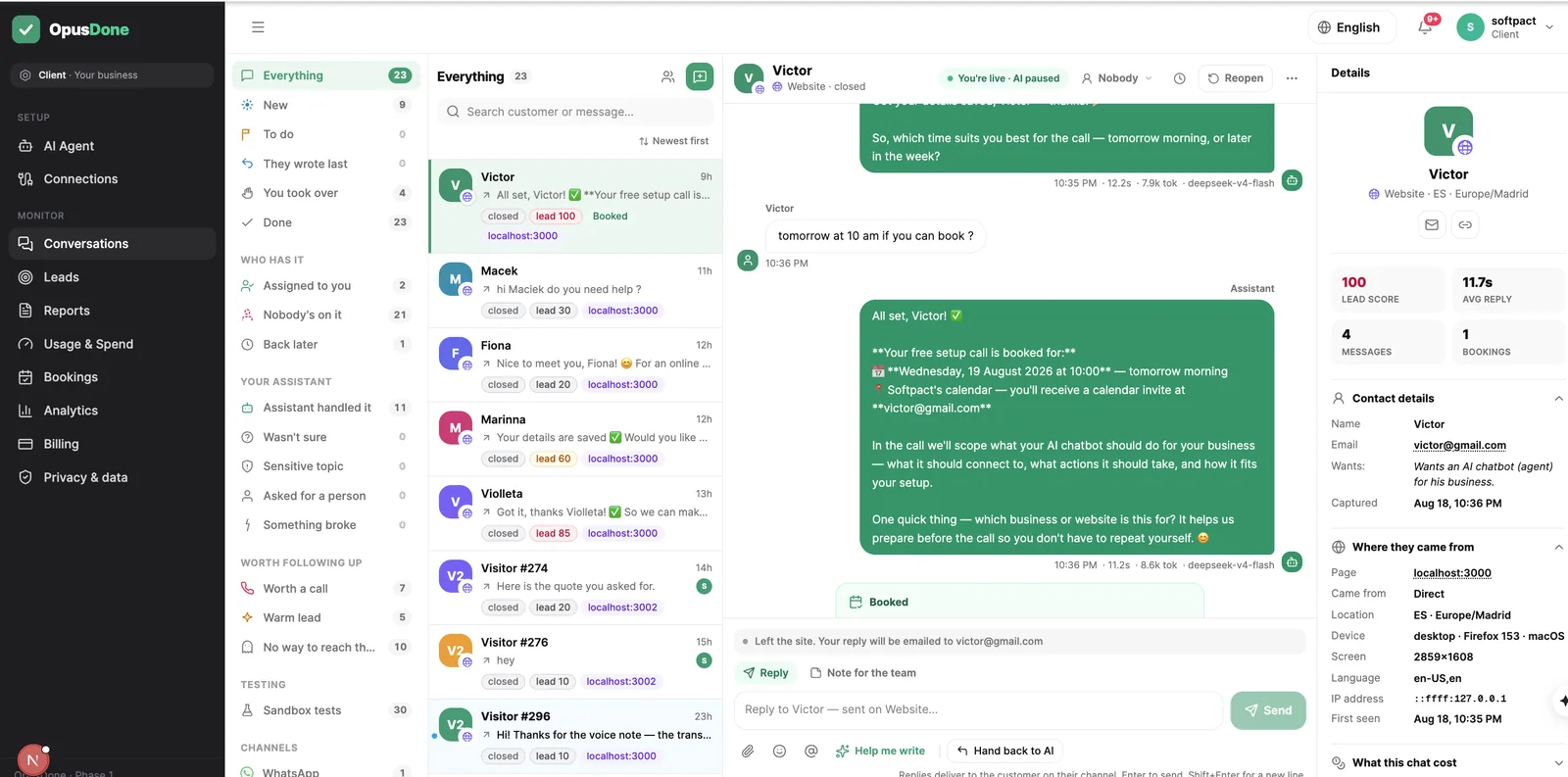
You open the dashboard to a short list, not a transcript
Each person becomes one lead with a plain score out of 100 — a phone number is worth 40, an email 40, a booking 40 — and you are alerted at 50, because one way to reach somebody is enough. People who showed real intent and left no contact go on their own list so you can see what you nearly had.
Filter, search, sort, export to CSV.

A day across every doctor’s calendar
Reception is on the phone. The assistant is answering everybody else.
- 09:12
A routine appointment, taken from the waiting room
Reception is on the phone to the lab. The patient scans the card, picks the doctor she always sees and takes a Thursday slot out of that calendar rather than anyone else’s.
- 18:40
A specialist enquiry routes itself
The clinic closed at six. He asks about a treatment only one of your doctors does, is offered only that doctor’s real availability, and books before he has looked anywhere else.
- 22:10
A patient in pain
It explains how an emergency appointment works from the answers you approved, says nothing about her tooth, and offers the first time anyone in the practice has free.
- 22:19
She writes something worrying
The message is treated as sensitive, so the alert tells you a sensitive topic needs you and withholds what she wrote.
- 07:45
You open one list, not one calendar per doctor
Three appointments are already in, each with the right doctor’s name on it, and the one alert that needed you is waiting with a single button.
Why does a clinic with several doctors lose bookings?
Most of it is not complicated. It is a calendar problem, and then it is an unanswered message.
A calendar each, and one phone line
Your receptionist is holding a handset, three people are waiting at the desk, and the question is whether one particular doctor has anything before the end of the month. Every booking is a look across every doctor’s calendar, and nobody outside the clinic can see any of them.
The same six questions, forever
Are you taking new patients. What does a first consultation cost. Do you see children. Where do I park. Every one of them has been answered before, by someone standing up with gloves on.
The hole in Thursday afternoon
A cancellation at four leaves a gap nobody fills, because filling it means working through a list while the next patient is already in the chair.
From your website to your waiting list
Nothing here needs a supplier visit or a change to how the surgery already runs. You can do the whole of it between two patients.
- 01
It reads the practice website you already have
The crawl looks for your treatments, prices, FAQ, contact and hours pages by English and Spanish keywords, then reads the meta description, Open Graph tags and JSON-LD for your phone number, address and opening hours. One model pass turns that into structured services, FAQs, policies and four to ten draft knowledge entries. It only fills fields that are still empty, so anything someone at the practice has typed can never be overwritten. - 02
You approve every word a patient can see
Only entries you mark live ever reach the assistant. Drafts, imports waiting for approval, archived and rejected entries are invisible to it, so a treatment you stopped offering in March simply is not there. A quality gate throws out navigation menus and cookie boilerplate, anything under 80 or over 4,000 characters, and near-duplicates at 85% overlap. - 03
You set surgery hours, closures and notice
Working hours, and closed days set by clicking one day or dragging across a run of bank holidays on the month calendar. Minimum notice is 120 minutes by default, slots 30 minutes, buffers zero and horizon 60 days, all of it editable, with slots always falling on a fixed 15-minute grid. Closures are mirrored into Google as an all-day “Closed — {your business}” event, and deleting that event does not reopen the day. - 04
You connect a calendar for the clinic, or one for each doctor
Google Calendar over OAuth with no API key, or Cal.com with one. It reads every calendar you mark as busy and merges them, so a doctor’s course or your own commitment elsewhere blocks the slot. It can book the clinic as a whole, or a named doctor once each has a calendar of their own, and the scopes are deliberately narrow: it can read and create events, and cannot delete your calendars. - 05
You test it as several different patients
The sandbox runs your real instructions and your real tools, then stops before it writes anything. No appointment is made, no lead is created, no alert is sent, no escalation fires. Type the message a frightened patient would type at that hour and read what comes back — the sandbox is free and never gated behind a plan. - 06
One line on your site, then it runs
The widget is a single script tag on the site you already have, with no iframe and no rebuild, and Telegram is the second live channel; every channel enters the same function, so the answer does not depend on the door the patient came through. Hours and closed days are checked before a slot is offered and again before it is written, and availability is re-read at the moment of writing so two patients cannot take the same slot. It replies in the language the patient wrote in, and the AI disclosure required by Article 50 of the EU AI Act is added once per conversation after the model writes, and cannot be prompted away.
A calendar for every doctor. One assistant across all of them.
Each doctor keeps their own hours, appointment length, break and specialisation, and the assistant books across all of them — offering only the times that person actually has free. A patient who asks for anyone gets the earliest opening in the clinic. Five people are included on Business and ten on Pro.
Chosen once, then left alone
What will OpusDone never do in your clinic?
The limits are the product. A front desk that guesses is worse than one that is closed.
It will not give clinical advice
No triage, no opinion on what that pain might be, no “it sounds like”. It says a person will help and fetches one.
It will not invent a price or a waiting time
If the fee for a treatment is not in the knowledge you marked live, it says it does not have that and passes you the enquiry. Drafts, website imports awaiting approval and archived entries are invisible to it.
It will not look at a photo of the problem
There is no image or document understanding. An attachment it cannot read skips the model entirely: it says so plainly and brings in a person.
It will not pass itself off as your receptionist
The AI disclosure required by EU AI Act Article 50 is added after the model writes, once per conversation, in the patient’s language, and it cannot be prompted away.
Dental clinic AI assistant questions, answered
Can a patient book with a particular doctor?
A patient writes in Catalan, or German. What does it reply in?
How do we stop it saying something the practice has not agreed?
What happens when a patient writes something distressing at midnight?
We keep appointments in our practice software. Does this still work?
Someone in pain asks to speak to a human at eleven at night. What happens?
Could it end up giving clinical advice?

More for busy dental clinics
Every calendar, answered by one assistant
Website widget and Telegram, on Google Calendar or Cal.com. It handles logistics and hands anything clinical to a person. Every captured lead is written to a Google Sheet in your own Drive within a minute, free on every plan — and the conversation summary is off by default, so you can send a patient’s contact details without ever transmitting what they said.
Get started