An AI receptionist that answers on chat, qualifies, books and knows when to fetch a person.
OpusDone is an AI receptionist that answers questions, qualifies enquiries and books appointments, then hands anything else straight to you. Your front desk is one person doing four jobs at once, and this takes the three that repeat. It works at 23:40 on a Sunday exactly as it does at 10:00 on a Tuesday.
- Answers at 23:40 on Sunday
- Books straight into your calendar
- Escalates the moment someone asks
Reviewed

A front desk that is already open
Nothing below needs anyone at the counter. Every step is something the assistant does on its own, or hands to you the moment it should.
- 07:40
Before you unlock
Someone asks what time you open and takes the first slot of the morning, with availability re-read at the moment of writing so the same slot cannot go out twice.
- 11:20
Two people at once
One is on your website and one is on Telegram, and both get the same answer from the same approved knowledge, because every channel enters the same function.
- 15:05
A file arrives
A visitor attaches a PDF quote; the assistant confirms it arrived, says plainly it cannot open it, escalates, and your inbox shows “📎 File: invoice.pdf”.
- 19:30
Someone wants a human
The EN/ES keyword guardrail catches the request even if the model misses it, and the escalation email goes out with who, which channel, why, three bullets, the recent transcript and one button.
- 23:10
After quiet hours begin
The booking is still made and the lead still reaches your Google Sheet within a minute, while quiet hours hold only the phone-noisy channels until morning.
Why do front-desk enquiries arrive when nobody is at the desk?
Enquiries do not arrive in office hours, and the ones that do arrive while you are with a customer.
Evenings go unanswered.
An enquiry sent at nine at night gets a reply at nine the next morning, by which time two other businesses have already replied.
The same eight questions, all day.
Opening hours, parking, price ranges, what to bring, whether you take walk-ins. Each one interrupts whatever is in front of you.
Nothing is written down.
An enquiry that does not book leaves nothing behind — no name on a list, no number to ring on Friday when you have a cancellation to fill.
One receptionist, covering every hour you are not there.
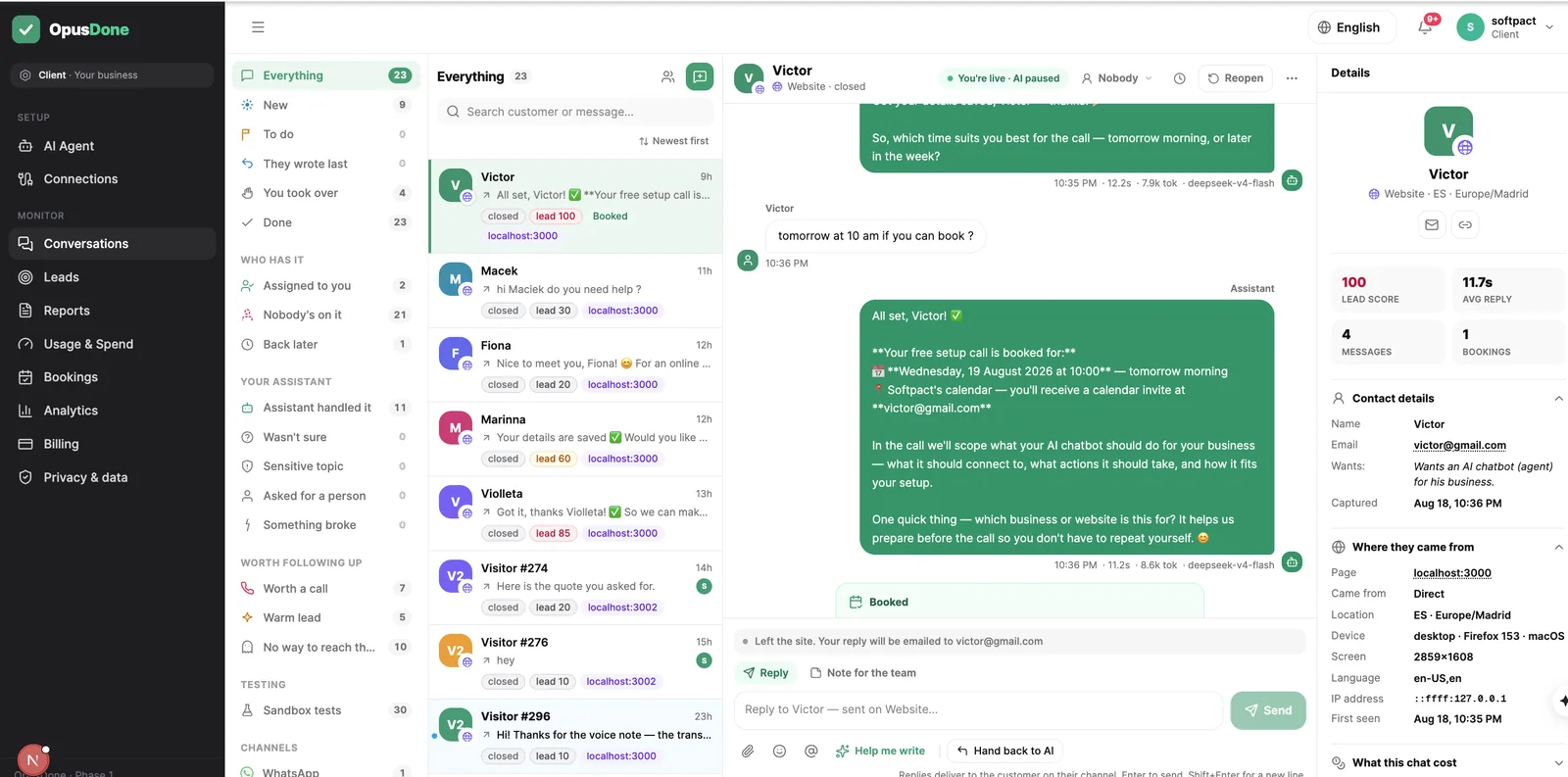
It greets, answers, qualifies and books. When something needs a person, the alert carries who it was, which channel they came from, a three-bullet summary and one button to open the conversation. You are not watching a screen — you are handed the two that matter.
Three things a front desk has to get right.
One brain, whichever door they use.
Website widget and Telegram are live today, and a single function handles inbound from both, so a customer who asks about parking gets the same answer either way.
WhatsApp, Instagram and Messenger are not live yet.
A calendar it cannot double-book.
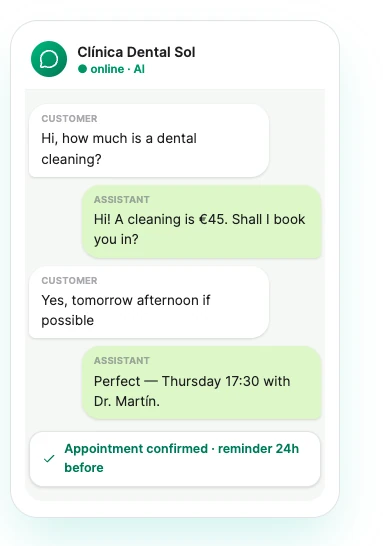
Availability is read again at the instant the reply is composed, not fetched once at the start of the chat, so a slot taken two minutes ago is never offered.
Google Calendar or Cal.com.

An email that says what the desk did.
A weekly digest and a monthly report showing bookings taken after hours, hours saved, how much your assistant closed out on its own and how that moved month on month.

opusdone.com/go/demo
A receptionist who is also on the glass.
The hardest shift to cover is the one nobody is there for. A code on the door is a desk that answers at half past ten at night, in the caller’s language, and writes the appointment into the same calendar the morning shift opens.
Everything it takes on lands in one inbox, with the two or three things that needed a person flagged.
How does OpusDone compare with the usual ways of covering the gaps?
What does a full day with OpusDone at the desk look like?
- 01
It opens in their language.
The greeting and everything after it match the language the customer wrote in. Nobody is asked to switch to yours. - 02
It answers from what you approved.
Services, policies, hours and FAQs you marked live. Anything you left as a draft or archived is simply not there to be quoted. - 03
It qualifies without interrogating.
The question gets answered first, then it asks once for a way to reach the person. Nothing is withheld in exchange for an email address. - 04
It fills the calendar.
Six options at most, no more than two from the same day, all of them checked against your hours and your closed days as the message is written. - 05
It hands over cleanly.
Five reasons trigger a handover: low confidence, sensitive, an explicit request, a tool failure, or other. Sensitive is locked on and cannot be switched off. - 06
It logs and alerts.
The bell always rings in the app and the email always sends, never held by quiet hours, with at most one alert per customer every 15 minutes. - 07
It reports at the end of the week.
A weekly digest and a monthly report by email: after-hours bookings, hours saved, the share your assistant handled alone, and the month-on-month change.
More people arrive at your website than walk through your door.
A receptionist who only answered the phone would be doing half a job. Most first contacts are now typed, out of hours, by somebody comparing you against two others in adjacent tabs.
- Picks up every first message, including the ones that arrive at 02:00.
- Knows your hours and your closures, so it never offers a slot you cannot keep.
- Takes a name and a number without it feeling like a form.
- Puts a person in front of anybody who asks for one, immediately.
What your assistant will never do at the desk.
A front desk is trusted for what it refuses to do as much as for what it handles. These are fixed behaviours, not settings you have to remember to switch on.
Keep someone talking to a machine.
An EN/ES keyword guardrail catches “speak to a human” and “quiero hablar con una persona”. If the model somehow misses it, the runtime escalates anyway.
Escalate a browser by mistake.
That same guardrail deliberately ignores the phrases “AI agent” and “chatbot”, so a prospect shopping for the product is not mistaken for someone demanding a person.
Book a day you have closed.
Working hours and closed days are checked before any time is offered, and offers are capped at six so nobody is handed a wall of slots.
Wake you at three in the morning.
Quiet hours default to 22:00–08:00 in your timezone and hold the phone-noisy channels only. The in-app bell and the email always land regardless.
Pretend to be one of your staff.
The AI disclosure is added after the model writes, once per conversation, in the customer’s language, and it is not something a client instruction can remove.
AI receptionist questions, answered
Does this replace my receptionist?
What happens outside opening hours?
Where do the conversations and contacts live?
Can it answer the telephone?
How does it learn my hours and services?
Can I rehearse it before it faces anyone?

More on the front desk
Nobody waits at your front desk again.
Free to build and test with no card, and 14 days from going live before payment is due. The sandbox runs your real instructions and your real tools, then stops before writing anything — no leads, no alerts, no escalations.
Get started