An enquiry arrives that may or may not be a real case.
An AI receptionist for law firm enquiries that stops short of advice.
OpusDone works as an AI receptionist for your firm’s first contact, answering the practical part of an enquiry and taking the details you always need. It reaches you as three lines in a form at 23:40, with no phone number and no idea whether it is a landlord dispute or a divorce. It gives no legal advice of any kind, and anything sensitive escalates to a solicitor through a rule that cannot be switched off. Logistics it can answer; the law it will not.
- No legal advice, ever
- Sensitive escalations withhold the content
- Intake details captured the same way
Reviewed

opusdone.com/go/demo
The enquiry that arrives at one in the morning.
A code at the foot of your letterhead, on the card you hand over after a first meeting, or in the client-care letter you already post. Somebody reads it at home, at an hour when nobody is at the desk, and it takes the matter type, the urgency and a way to reach them — while giving no advice of any kind.
That code opens our own OpusDone assistant — the same assistant your firm would get. It answers only from what you approved, and it does not advise.
Why does the first contact with a law firm land out of hours?
Half of it is not work you want
Somebody outside your areas, somebody chasing a fee you do not charge, somebody who needed a different firm three months ago. Sorting that costs a fee-earner an hour a week in five-minute pieces.
The other half is raw
People write to solicitors on the worst evening of their year. A form that answers nothing, or a bot that chirps back, is the wrong reply to a message about a dying parent or a police interview.
You always need the same four things
A name, one way to reach them, roughly what it concerns and whether a date is running against them. Nobody ever includes all four, so the first email you send is always the same email.
It may be a case, and it may be painful
You cannot tell from the first line. Neither can a contact form.
- 20:48
Someone starts typing
They find your site at the end of a bad day and write two hesitant sentences.
- 20:50
Facts, never advice
It answers only what you approved: the areas you take, how a first meeting works, what it costs.
- 20:53
It reads as sensitive
The escalation happens without asking, because sensitive is locked on and cannot be switched off.
- 20:54
You are told, not shown
The email and the Telegram card both withhold the content and say only that a sensitive topic needs you.
- 08:20
You take it over
Two taps pause the assistant, and thirty minutes of silence would have handed it back on its own.
From your practice areas to a first appointment
The point is not to answer the enquiry. The point is to hold it properly until you can.
- 01
It reads the firm’s site and drafts, nothing more
The crawl identifies your practice areas, fee pages, FAQ, contact and hours pages by English and Spanish keywords, then reads the meta description, Open Graph tags and JSON-LD for address, telephone and opening hours. One model pass produces structured services, FAQs, policies and four to ten draft knowledge entries. It fills only empty fields, so wording your firm has already settled on cannot be rewritten by a crawl. - 02
Nothing is said on the firm’s behalf until you mark it live
Drafts, imports awaiting approval, archived and rejected entries are invisible to the assistant; only live entries reach it. A quality gate discards navigation soup, cookie notices, anything under 80 or over 4,000 characters and near-duplicates at 85% overlap. Each turn is limited to 12,000 characters of knowledge with no single entry taking more than 40%, so your fee note is never crowded out by one long article. - 03
You set consultation hours and how far ahead it books
Working hours, plus closed days set by clicking a day or dragging a range on the month calendar — court holidays and the August shutdown included. Minimum notice is 120 minutes by default, slot length 30 minutes, buffers zero and horizon 60 days, all of it editable, with times always on a fixed 15-minute grid. Edits reach the assistant in about 15 seconds, so a calendar change made at nine is in force before the ten o’clock enquiry. - 04
You connect a calendar for the firm, or one for each solicitor
Google Calendar over OAuth, or Cal.com with an API key. Every calendar you mark as busy is read and merged, so a hearing already in a partner’s calendar removes the slot. It can book the firm as a whole, or a named solicitor once each has a calendar of their own, and its access is narrow by design: it can read and create events, and cannot delete a calendar. - 05
You rehearse the enquiry you dread
The sandbox runs your real instructions and your real tools and stops before it writes anything — no appointment, no lead, no alert, no escalation. Put in the enquiry that is half a legal question and half a personal crisis, and watch where it stops talking and asks for a person. It is free and never gated, so you can rehearse it as often as you like before anyone outside the firm sees it. - 06
One line on the site, and it holds the door
The widget is a single script tag on your existing site, and Telegram is the second live channel; both run through the same function, so an enquiry gets the same handling either way. Hours and closed days are checked before a slot is offered and again before it is written, availability is re-read at the moment of writing, and event ids are deterministic so a retry cannot create a duplicate appointment. It answers in the language the enquirer wrote in, and the AI disclosure required by Article 50 of the EU AI Act is added once per conversation and cannot be prompted away.
Intake that runs at midnight, and stops short of advice.
It takes the name, the matter type, the contact details and the urgency, and puts a structured enquiry in front of you instead of a voicemail. It gives no legal advice of any kind — which is exactly why you can leave it answering the enquiries that arrive at one in the morning.
Logistics answered, substance escalated.
The questions it takes off your desk
Five it will answer today, from knowledge you approved: “Do you offer a first consultation, and what does it cost?” · “Which areas of law do you actually take on?” · “Do you work in English as well as Spanish?” · “Where is the office and is it step-free?” · “What should I bring to a first meeting?”.
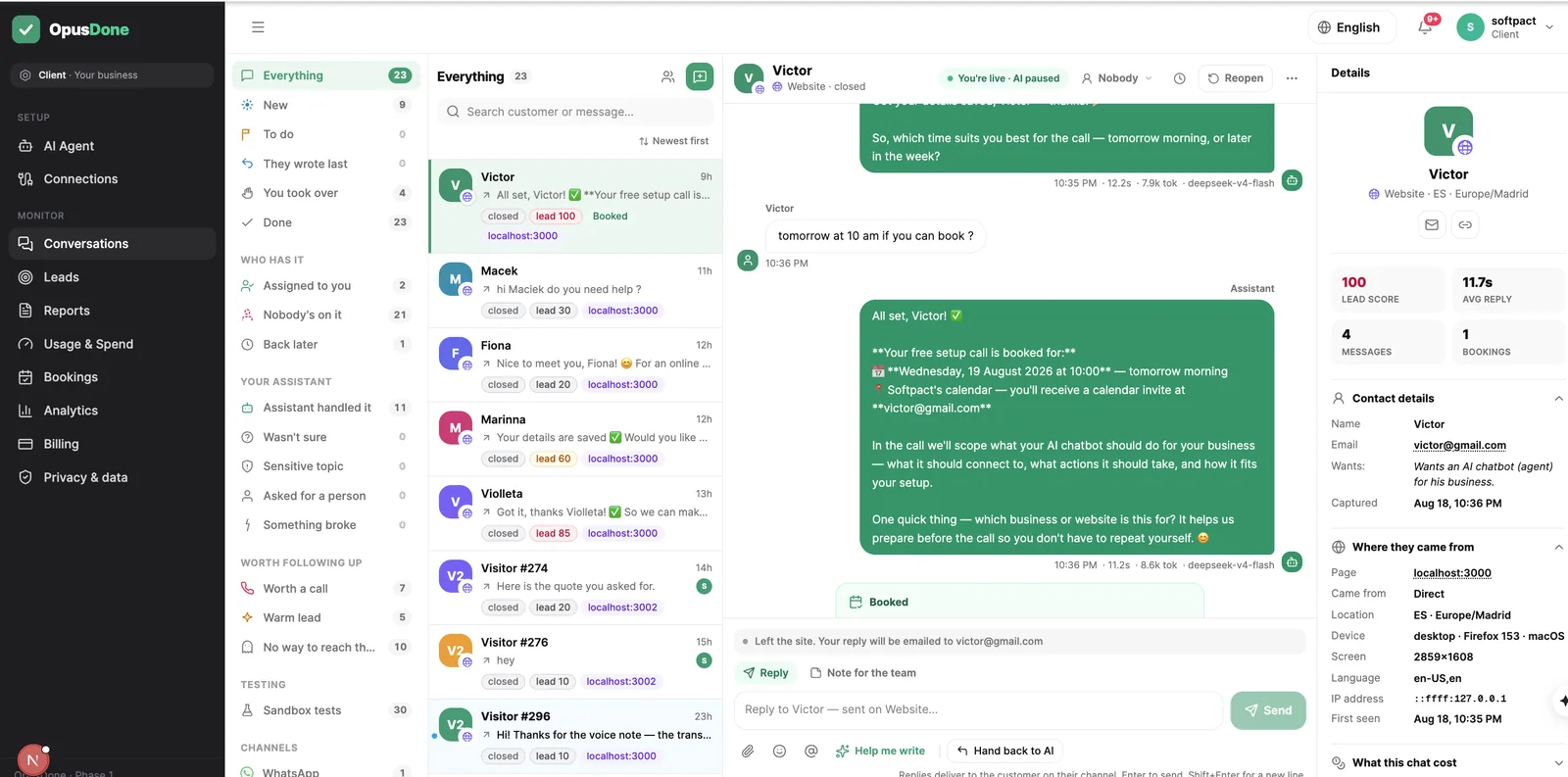
The intake details, captured the same way every time
Contact and context become one lead with a published arithmetic score: name +10, email +40, phone +40, company or website +25, three or more messages +10. You are alerted at 50, because one reachable contact is enough to act on. People who described a real problem and left no way to reach them go on an unreachable list rather than vanishing.
One lead per person across channels. Export to CSV.

A first consultation put in the calendar while you sleep
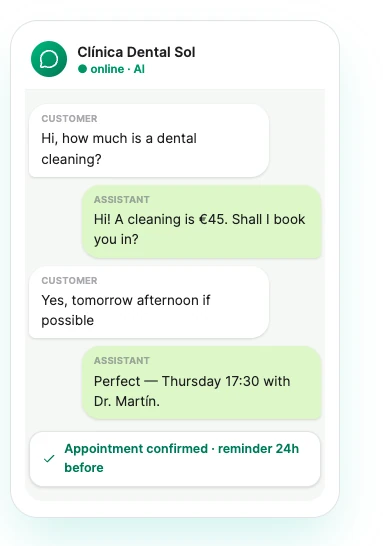
It offers at most six times, at most two from any one day, checked against your hours and your closed days and re-checked at the instant of writing. Minimum notice defaults to 120 minutes so nobody appears in reception twenty minutes from now, and event ids are deterministic, so a retry after a timeout cannot create the same meeting twice.
Google Calendar or Cal.com. One calendar for the firm, or one for each solicitor.

An enquiry form asks a stranger to trust you first.
Somebody with a problem they have not said out loud yet will not fill in four fields and wait two days. They will ask one careful question, and then decide. It answers what you approved about scope, fees and first consultations — and it does not give advice.
- Answers procedure and price, never the merits. It will not tell anybody what their case is worth.
- Books the first consultation into a real calendar, with the fee basis stated before they commit.
- Escalates anything sensitive to a person immediately, and says that it is doing so.
- Never invents a deadline, a limitation period or an outcome. If it has not been told, it says so.
What does OpusDone ask every enquiry?
You approve each answer before it can ever be used.
- Which areas of law you take, and which you turn away.
- How a first meeting works, and what it costs.
- Your hours, your closed days, the August shutdown.
- Where you are, and whether you meet by video.
- Sensitive escalation is locked on and cannot be switched off.
- Leads land in a Google Sheet in your own Drive.
- The conversation summary is off by default, so only contacts travel.
- Email alerts always arrive; quiet hours never hold them.
- Attachments arrive, cannot be opened, and always reach a person.
- Replies follow the client’s language, nine of them mapped.
- Everything tested in the sandbox before a word goes live.
What will OpusDone never do for your firm?
A receptionist who improvises is a professional-indemnity problem. This one cannot.
It will not give legal advice
No view on the merits, no reading of a clause, no “you probably have a claim”. Anything substantive goes to a person, and the enquirer is told a person is taking over.
It will not quote a fee you have not published
It answers only from knowledge you approved as live. It will not estimate, will not promise a timeline and cannot offer to check something and come back later.
It will not read the documents attached
There is no document or image understanding at all. Files it cannot read skip the model entirely; it says so and brings in a person rather than pretending to have looked.
It will not let anyone talk it into being something else
A platform layer of the prompt, which you cannot edit and a client cannot override, scopes it to your firm alone. If someone asks for a person and the model does not escalate, the runtime escalates anyway.
Law firm AI receptionist questions, answered
Where is the line between logistics and advice?
What does an escalation actually reach us as?
Does the enquirer know they are writing to software?
Where does what an enquirer tells it actually sit?
Can it run a conflicts check or decide whether we take the case?
Where does the data sit, and can we get it out?
Could it give legal advice, or walk the firm into a conflict?

More for professional practices
It handles the logistics and hands you the rest
No legal guidance of any kind: it books, it explains process, and anything substantive goes to a solicitor. Lead delivery to your own Google Sheet or any https endpoint is free on every plan, and the transcript summary stays off unless you switch it on.
Get started