An AI chatbot that stays inside what you told it
OpusDone is an AI chatbot for your website that goes live as one script tag on the site you already have — no iframe, no rebuild. It answers only from knowledge you approved as live, in the language the customer wrote in, and it accepts files up to 25 MB. When it cannot help, it says so plainly and puts a person on the thread.
- One script tag, no iframe
- Files up to 25 MB
- Leads delivered within a minute
Reviewed

Website enquiries are lost quietly
Nothing dramatic happens when a website chat fails. The visitor simply closes the tab, and no one ever finds out what they wanted.
A visitor is one click from gone
Someone reading your site has given you no name, no email and no reason to expect a reply. They have a question, your tab open and four other tabs behind it. If the answer is not in front of them while they are still reading, the visit ends. That is why your assistant answers first, asks for a contact detail once, and never makes an answer conditional on getting an email.
The question arrives as a picture
People do not describe the cracked screen, the leaking joint, the rash or the quote from someone else. They photograph it. Ask them to type it out instead and a good share of them stop typing altogether. A chat box with nowhere to put a file turns the most serious enquiries into the ones you never receive.
Nothing is written down
The conversation happens, the visitor leaves, and there is no record of who they were, what they asked or how close they were to buying. On Monday somebody asks where the week’s enquiries went, and the honest answer is that they were never written down anywhere a human could read them.
What does OpusDone do when the answer is not obvious?
How do you put OpusDone on your website?
Every step below is something you do once. Nothing here needs a developer beyond pasting a single line into your template.
- 01
Point it at your website
A crawl picks out your pricing, services, FAQ, contact and hours pages using English and Spanish keywords, then reads the meta description, Open Graph tags and JSON-LD for phone, address and opening hours. One model pass turns that into structured services, FAQs, policies and four to ten draft knowledge entries. It only fills fields that are empty, so it can never overwrite something a human typed. - 02
Approve what it may say
Only entries you marked live ever reach the assistant. Drafts, website imports waiting on approval, archived and rejected entries are invisible to it. A quality gate throws out navigation soup, cookie boilerplate, anything under 80 or over 4,000 characters, and near-duplicates at 85% overlap. - 03
Watch the knowledge budget do its job
Each turn has a budget of 12,000 characters of knowledge, and no single entry may take more than 40% of it. That rule exists for one reason: your opening hours cannot end up buried behind one enormous page that swallowed the whole budget. - 04
Test it in the sandbox
The sandbox runs your real instructions and your real tools, then stops before writing anything. No leads, no alerts, no analytics, no escalations — just the answers it would have given. It is free and never gated, so you can break it in private for as long as you like. - 05
Paste one script tag
One line on the site you already have. No iframe, and no separate page to maintain. The widget is live today alongside Telegram, and every channel enters the same function, so the answer does not depend on which door the customer walked through. - 06
Decide about files and voice
Uploads are on out of the box, up to 25 MB. You can set a stricter cap for your business or switch uploads off entirely. Voice notes are off until you turn them on, because transcription costs money. The same switch and the same budget cover voice notes arriving from Telegram and WhatsApp. - 07
Connect a calendar
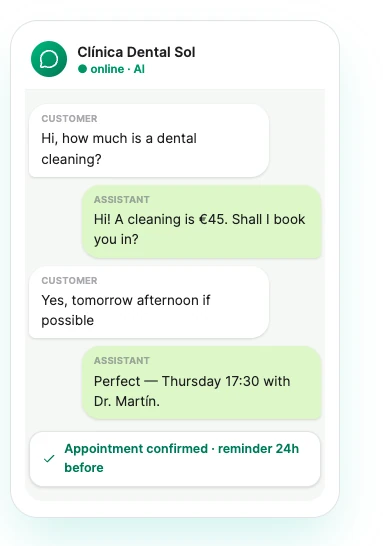
With Google Calendar or Cal.com connected, the assistant checks your working hours and closed days, offers at most six options with at most two from any one day, and keeps two hours’ minimum notice by default. Availability is re-read live at the moment of writing, so it cannot double-book, and deterministic event ids mean a retry cannot create the same booking twice. - 08
Choose where leads land
Every captured lead is written to a Google Sheet in your own Drive, or posted to any https endpoint you name, within a minute. Ten columns: Date, Name, Email, Phone, Channel, Score, Status, Booking, Summary, Lead link. Requests are signed with HMAC-SHA256 and retried six times on a widening curve. This is free on every plan, including the trial.
What happens when someone sends OpusDone a photo or a PDF?
A photo arrives, and a person picks it up
A visitor can attach a photo, PDF, Word, Excel, CSV or plain-text file, up to 25 MB. The assistant confirms the file arrived, says plainly that it cannot open it, and hands the conversation to a person. It never guesses at the contents. A file always creates an escalation, so it lands in your inbox as something needing a human, not as another read message.
Photo, PDF, Word, Excel, CSV, text
Hold the mic, speak, get an answer
With voice notes switched on, a visitor holds a button and records straight in the browser — nothing to install. The assistant answers the words the customer spoke, and the recording stays in the thread beside the transcript so you can hear the tone yourself. It needs a modern browser with microphone support over HTTPS.
Off until you switch it on
Your inbox says what came in
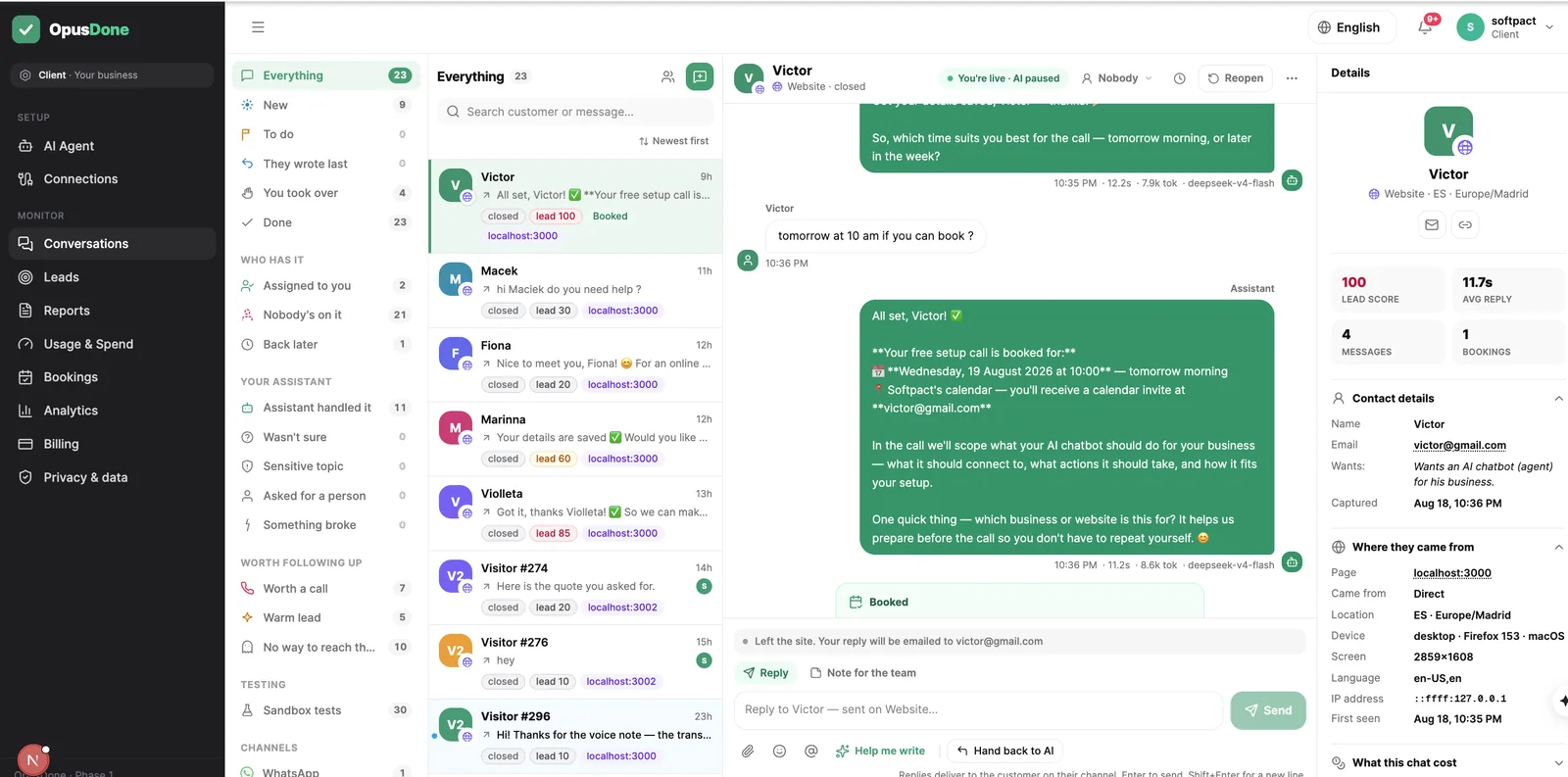
Threads are labelled the way you would label them: “📷 Photo”, “🎤 Voice note · 0:04”, “📎 File: invoice.pdf”, with the image or the audio player inline. You see the attachment and the transcript in the same place as the conversation that produced them.
Image and audio play inline

Every conversation leaves a lead behind
Name, email, phone, Telegram handle, company, website, intent, first channel, source, status, score and owner, with first and last activity. One lead per person across channels, deduped on email, phone or visitor key with a unique index. Filter by status and channel, search the free text, sort by score or recency, export CSV.
One person, one lead

Fixed limits, published
What it will never do
These are not settings you have to remember to switch on. They are written into the platform layer of the system prompt, which is appended after your own instructions and cannot be edited — so neither a customer nor a badly written instruction can override them.
Never reads your visitor’s files
There is no vision path and nothing is scanned. The assistant acknowledges the file, states that it cannot open it, and escalates. If you ever see a chatbot describing the contents of an uploaded photo, it is doing something we deliberately do not do.
Never invents a price or a date
The rule is literal: never invent prices, timelines, capabilities, availability or facts not present here. If it is not in the knowledge you approved, the assistant says it does not have it and offers a person instead.
Never promises to get back to you
A separate rule forbids offering actions it cannot perform. It cannot check stock or prices, track an order, send a document or apply a discount, and it is not allowed to say “I’ll find out and get back to you” to paper over the gap.
Never speaks for another business
The platform layer states that the assistant is strictly scoped to one named business and may only use the knowledge supplied for it. Data is isolated per business, credentials are encrypted at rest, and the application, database and file storage run on servers in Germany.
Never pretends to be a person
The AI disclosure required by EU AI Act Article 50 is added after the model has written, once per conversation, in the customer’s language. It cannot be prompted away by a visitor or removed by an instruction.
Website chatbot questions, answered
What actually happens when someone uploads a photo?
Do I have to allow uploads?
Will voice notes work for all my visitors?
Where do my leads go?
Which files can visitors send, and how big?
How do voice notes work, and do they cost anything?
What stops people abusing the upload box?
What if the assistant does not know the answer?
More on the website widget
Build it free. Test it before it goes live.
The sandbox runs your real instructions and stops before writing anything, and it is never gated. No card to build and test; 14 days from going live before payment is due. Starter €39/mo, Pro €99/mo, Business €199 coming soon, 15% off yearly.
Request access